LEGO Mindstorms Sudoku Solver

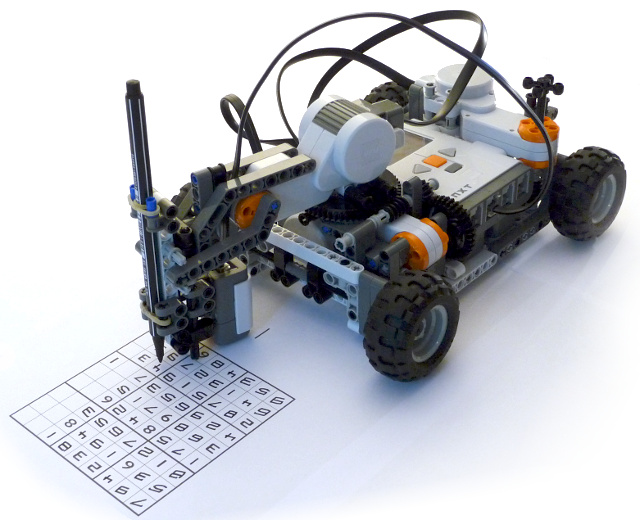
This little robot solves a
sudoku puzzle all by itself.
It scans the sudoku puzzle using a light sensor. It calculates the
solution to the puzzle and then writes the digits.
Scanning
It first performs a quick scan to determine which
cells are
empty. It sweeps the light sensor over the sudoku puzzle
while continuously
reading the sensor values.
Each
non-empty cell is then handled. An image of the digit is created by
scanning the cell line by line moving the robot forward a tiny bit for
every line.
Thresholding
The scanned image is very noisy and blurred.
To make it more sharp the image is transformed to a binary image (black
and white).
Each pixel with a value below a threshold value is set to black. And
the rest of the pixels are set to white.
The
values from the light sensor are very close to each other and the
overall values are affected by surrounding light, distance
between surface and sensor and so on.
The threshold value is calculated by applying an automatic threshold
algorithm (The Otsu Method).
Segmentation
The
binary image may have more than one segment. It may have pixels not
belonging to the digit. The center segment is found and other segments
are deleted.
Thinning
The image is converted to 1-pixel wide lines with a thinning
algorithm.
Feature extraction
Now the digits are classified by extracting some features from
them:
- Width of the digit
- Number of tips
- Position and direction of tips
For example a digit with only one tip which is pointing to the right is classified as 6.
![]() |
![]() |
![]() |
![]() |
| Raw image | Thresholding | Segmentation | Thinning |
Solving the Sudoku
Solving a sudoku puzzle is a quite simple task for a computer. It is usually implemented using a recursive backtracking algorithm. But since the Mindstorms processor is rather slow, and since it doesn't allow for recursive functions, it took some care to optimize it.


